Recall Alert
There are recalls of ibuprofen and eye drops. Learn more >>
There are recalls of ibuprofen and eye drops. Learn more >>

Click here to like us on Facebook and receive all of our updates on your news feed!
It is not our intent to review every app or media device that has been or will soon be released. Rather our goal is to provide a framework, based upon well established clinical considerations for feature matching a person's strengths and needs to available tools and strategies (Shane and Costello, 1994), and apply that to comparing and selecting an iDevice platform and apps (refer to Table). Only through an informed clinically based selection, can we minimize the emerging trend toward selecting communication apps based on the robustness of media coverage, public testimonials or recommendations from well meaning friends and family.
To this end, a chart was created to detail the features known to be vital considerations for a broad profile of people with complex communication needs. Not all of these features currently exist in apps thus highlighting the need to match a person’s needs to the right tools and strategies and NOT try to fit a person to a specific platform or app. In addition, this chart should be considered as dynamic ( the number of communication apps is constantly growing as is the scope of available features).
The Chart:
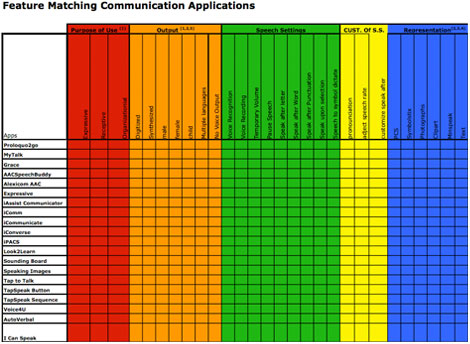
Feature Matching Communication Applications Chart (PDF)
To better understand the application of the chart, a case study will illustrate application of the assessment process and use of the app feature matching process/chart.
Case Study:
Nancy, a 69-year-old woman with Bulbar ALS was seen in August 2010 (Table 1.1 & 1.2)
|
|
|
|
| Representation |
|
|
| Rate Enhancement |
|
|
| Display Settings |
|
|
| Access/Motor |
|
|
| Purpose of Use and Patients “requests” |
|
|
In Nancy’s case, the iPad is a tool that meets most of her communication needs, serving as her primary communication system. Recommendations in addition to the iPad during the AAC consultation included use of pen and paper (for written messages) and a low-tech alphabet board. Yet the iPad will be used as her primary tool due to the voice output features, ability to pre-store messages, and word prediction (thus enhancing the rate of communicative interactions). Assistive Chat was selected as the primary communication app, matching key features that Nancy needs within her price range (Table 1.2).
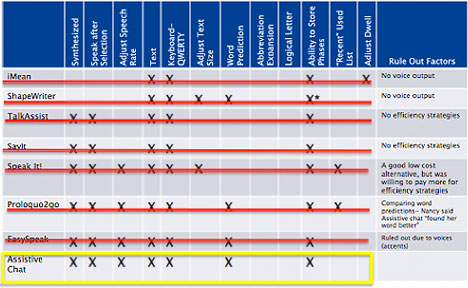
In Nancy’s case, both Prolqou2go and Easy Speak had just as many “matched” features to the final app choice. Yet in trialing them in the assessment with Nancy, she voiced a clear preference for Assistive Chat (due to quality of voice and what she described as “the best prediction”); thus stressing the importance of step four in Table 1.2.
ASHA Perspectives, July, 2011
Using a Clinical Approach To Answer “What Communication Apps Should We Use?” (PDF)
Gosnell, Costello & Shane
ASHA Leader, October 11, 2011
Apps: An Emerging Tool for SLP's
Jessica Gosnell
Alternative Access Assessment for AAC ASHA 2018
ASHA 2018 - AAC ICU and Acute Care Settings - requirement for best care
Speech synthesis history current and future asha
First then, 2018 (ACP Facebook download)
Communication Profile Template
Cursor Access to keyboard and Mouse
Cursor Access to Keyboard and Mouse for MAC
HeySiri info
Inpatient Communication Profile
AAC and VI #1
Inpatient AAC position
Welcome Peggy
Welcome Amaliya
Bilingual GoTalk Now
AAC and Trach Santiago ASHA 2015
inpatient Social story one
inpatient Social story two
Message Bank Resource
ALS Program two-pager.2
Aided Language Stimulation
ALSMND ISAAC 2016
Lisa Bardach Communication Needs Questionnaire
ALS Newfoundland full day lecture
ASHA 2016 Costello and Dellea
Visuals for Receptive Language A. O'Brien
Message banking and Legacy Message definitions and examples
BCH ALS Message bank, Legacy Message definition and examples 2017
Core Vocabulary and Literacy
Lisa Bardach app comparison
Katie O'Neil AAC, VI and Low Tech access to language
2017 Mass Down Syndrome Congress Rose and Grossman
ASHA 2014
ISAAC 2014 Lisbon, Portugal July 19-24
NORWAY ISAAC Costello, J.M. April 2013
DRAFT GUIDE FOR MESSAGE BANK: This guide features the working definitions and terminology being used when introducing the concept of 'Message Banking"
http://www.childrenshospital.org/clinicalservices/Site2016/Documents/messagebankguidedraft.pdf
MESSAGE BANKING: Messages banked by many people with ALS in the event they need to use a speech generating device July 2012. (part of the evolving BCH Augmentative Communication Protocol for Message Banking)
http://www.childrenshospital.org/clinicalservices/Site2016/Documents/PALSexpressions.pdf
These PowerPoint "dynamic displays" were created to support our patients and families to have experience and practice with navigating dynamic pages while waiting to purchase a commercial software program or arrange a trial with a dynamic display speech generating device.
To access the slides missing from the 4/24 Needleman Conference "Evidence-Based Communication Treatment for Children with ASD," please click on the link below.